Applications
Here, you can learn about how to create, edit, and remove applications, and how people apply for the application you made! Whether it's a moderator application, a designer or any other, EasyApps got you covered with an unlimited number of questions!
How to Create Applications
To create an application, first you have to run the command /create_application. This command will open up a panel like below.
In the panel/embed, you can see a couple of options, which are necessary for applications.
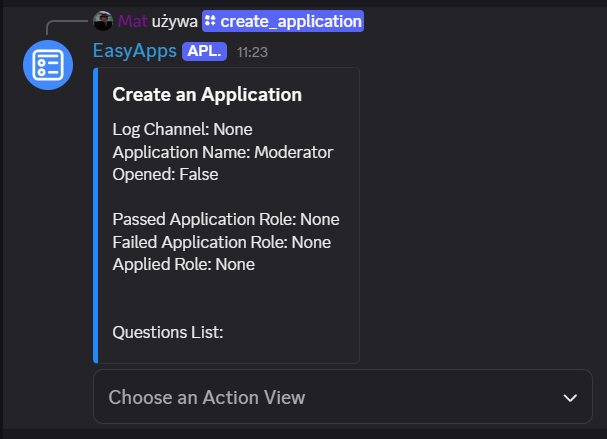
| Option | Description |
|---|---|
| Log Channel | Channel where filled applications for review will go. |
| Application Name | The name of the application. |
| Opened | Whether the application is opened or not — whether people can apply for it. |
| Passed Application Role | The role given to people who passed their application. |
| Failed Application Role | The role given to people who failed their application. |
| Applied Role | The role given to people who have applied. |
| Questions List | List of questions. |
The log channel must be filled to create the application.
In the panel, you can also find a dropdown menu with the following options. The dropdown menu was made to easily navigate the menu, grouping everything into their own section for readability.
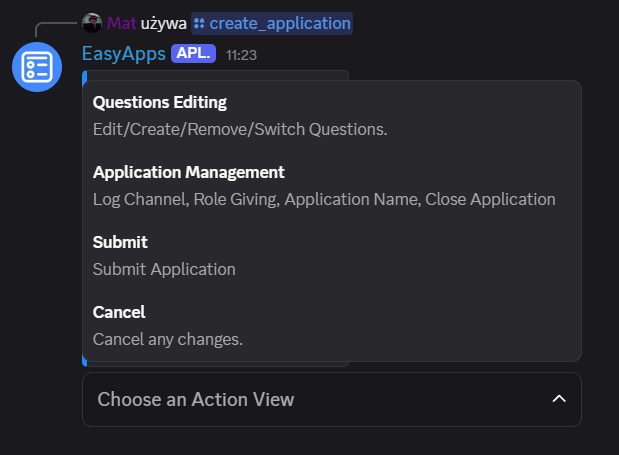
| Option | Functions Included |
|---|---|
| Questions Editing | Create, Edit, Remove, Switch questions. |
| Application Management | Log Channel, Application Name editing, Application Roles Management, Open/Close Application. |
| Submit | Create application. |
| Cancel | Cancels the application process editing. |
All those functions can help you manage applications to your liking. You can make as many questions, edit applications after they are submitted and just fully remove applications if you don't need them. There is no limit on how many applications you can make!
How to Edit or Remove Applications
To edit applications, run the /edit_application command, and you are met with the same panel as in Creating Applications.
To remove applications, run the /remove_application command.